
RP 1210
Brief introduction to RP1210
RP 1210 is a proven programming interface initiated through the “Recommended Engineering and Maintenance Practice” of the Technology & Maintenance Council (TMC) and the American Trucking Associations (ATA). This interface primarily enables access to vehicle communication interfaces (VCIs) in the truck sector. RP 1210 allows access to J1708/J1587, CAN, J1939, and J1850 bus systems. Key use cases include programming, diagnostics, and analysis. Much like SAE J2534, the diagnostic interface can be used independently of the OEM—a clear advantage for workshops.
Overview
The following diagram shows a simplified workflow of how an application uses RP1210:
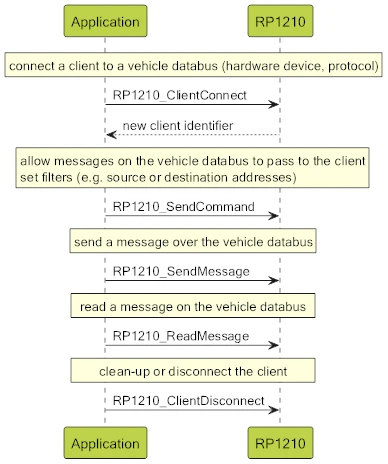
RP1210_SendMessage transfers a byte buffer to the RP1210 library. The application is responsible for ensuring that the buffer content is in the format appropriate for the protocol. For ISO15765, for example, the format is as follows:
1 byte (Message Type) + 4 bytes (CAN ID) + 1 byte (Extended Address) + (0–4096) message bytes
RP1210_ReadMessage returns a byte buffer, the format of which depends on the protocol. For ISO15765, the following information is added to the beginning of the buffer in addition to the format described above:
4 bytes (time stamp) + 0/1 (echo) + 1 byte (indication status)
Echo: when enabled, indicates whether the client originally sent the message. If echo mode is disabled, this byte is not present.
Indication Status: Message acknowledged, error occurred, first message of a segment (first frame of a multi-frame message).
The API offers the following functions:
| Function | Description |
|---|---|
| RP1210_ClientConnect | Establishing a logical connection to the RP 1210 DLL. |
| RP1210_ClientDisconnect | Terminating the logical connection to the RP 1210 DLL. |
| RP1210_SendMessage | Sends a message to the RP 1210 DLL. |
| RP1210_ReadMessage | Reads a message from the RP 1210 DLL. |
| RP1210_SendCommand | Sends a command to the RP 1210 DLL. |
| RP1210_GetErrorMsg | Translates an RP 1210 error code into text. |
| RP1210_GetLastErrorMsg | Translates an RP 1210 error code into a more detailed text. |
| RP1210_GetHardwareStatus | Returns the connection status. |
| RP1210_ReadVersion | Reads the version information of the RP 1210 API DLL via the API. |
| RP1210_ReadDetailedVersion | Reads the version information of the RP 1210 API DLL via the API (new preferred version). |
| RP1210_Ioctl | Used to change the status of vehicle communication. This was introduced in RP1210B and is currently used by RP1210 only for ISO9141 and KWP2000 communication. This function enables the future development of RP1210 to support additional automotive protocols. |
Features
- Multiple client applications can access the same vehicle bus in parallel.
- It is the task of the client application to assign the messages to the corresponding control units.
- Pure C API with 11 functions
- Error Handling by Evaluating Return Values (No Exceptions)
- Specified primarily for Windows
Since RP 1210 is a relatively simple programming interface, a large part of the logic must be handled by the application itself.
Integration into an Application
Every RP 1210 installation includes an .INI file and a .DLL file. The RP 1210 specification mandates the format for the filenames and their paths.
| File type | Installation path | File name |
|---|---|---|
| INI | GetSystemWindowsDirectory – WIN API | VENDRX32.ini |
| DLL | GetSystemDirectory() – WIN API | VENDRX32.dll |
VENDRX is the manufacturer name of the interface.

Do you have any questions about our products or services?
We are here for you! Send us your inquiry using the contact form – our team will get back to you as soon as possible.